HTTP caching can make a website feel faster and reduce repeated work, but caching rules are easy to misunderstand when headers are treated as magic phrases. The server sends instructions, the browser or intermediate cache follows those instructions according to its capabilities, and the result depends on whether a stored response is still considered fresh or needs validation. A small local experiment makes those decisions visible.
This guide explains common response headers, how freshness differs from validation, and how to observe the browser's behavior without changing a production service. The examples use a simple local HTTP server and browser developer tools, but the same reasoning applies to API responses and many hosted applications. Test only on systems you own or are authorized to inspect.
Separate storage, freshness, and validation
A cache stores a response so it may be reused. Freshness describes whether that stored response can be reused without asking the origin server again. Validation is a process through which a cache asks whether its stored representation is still current. These are related but different concepts. A response can be stored yet require validation before reuse, or it can be fresh for a period and reused without a network round trip.
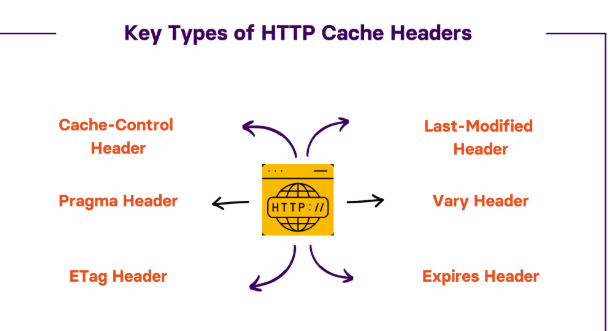
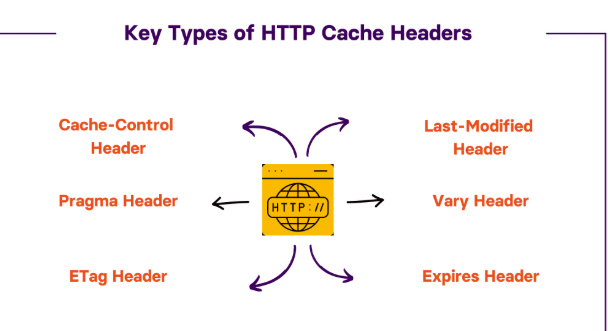
Three headers illustrate the distinction. Cache-Control expresses caching directives and freshness lifetimes. ETag can provide a validator for a particular representation. Last-Modified can provide a timestamp-based validator. The client or intermediary may send a conditional request using the validator so the server can confirm that the stored response remains current.
Do not infer that every response visible in a browser was served from disk cache. Developer tools may show memory cache, disk cache, a service worker, or an actual network response. A proxy or CDN may also cache the response independently. The first task in an experiment is to observe which layer handled the request and then connect that observation to the headers.
Build a minimal local experiment
Create a directory containing a small HTML file or text resource. Serve it through a local development server that lets you control response headers. If you do not have such a server, use a small script in a language you already know or a development tool designed for local HTTP testing. Avoid using a public production website as the experiment target because its caching rules and intermediaries are outside your control. Keep the results as short HTTP notes so the test can be repeated after the server or browser setup changes.
Open the resource in a browser and inspect the request and response in developer tools. Record the status code, response headers, timing, and whether the browser identifies a cache hit. Reload once, then reload again without changing the file. The exact labels vary by browser, so record what your tool actually shows rather than relying on a label from a different version.
Start with an explicit freshness policy, for example:
Cache-Control: max-age=60
This says the response can be considered fresh for a limited period under the applicable cache rules. It does not mean that every cache must store every response or that a browser is forbidden from revalidating for other reasons. Caching behavior also depends on request directives, response status, privacy context, and intermediary policy.
Observe a fresh response
Fetch the resource once and note the response. Immediately request it again. If the browser is permitted to reuse the fresh response and the relevant cache is available, the second request may avoid contacting the origin. After waiting beyond the freshness period, request it again and observe whether the cache checks with the server or retrieves a new representation.
Do not interpret a reload button as one universal kind of request. Browsers offer normal reload, hard reload, and cache-disabling developer options that deliberately change the experiment. Keep the test method consistent and note any bypass option that is enabled. A hard reload may not represent how a regular visitor experiences a page.
To understand an apparent contradiction, compare the response headers with the actual request. A cache may have been bypassed, the response may have included a directive preventing storage, or a service worker may have intercepted the request. Change one setting at a time and repeat the test. The aim is to build a cause-and-effect model rather than memorizing a screenshot.
Add an ETag validator
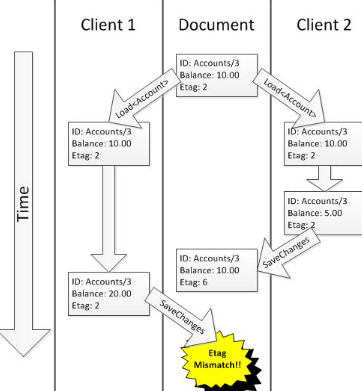
An entity tag is an opaque validator that identifies a particular representation. The server can include an ETag header in a response. On a later request, a client may send If-None-Match with the stored tag. If the representation has not changed, the server can respond with 304 Not Modified, allowing the client to reuse its stored body. If it has changed, the server returns the current representation, typically with a new validator.
The tag is not necessarily a content hash, and clients should not interpret its internal characters as a meaningful timestamp or version number unless the application explicitly defines that behavior. Treat it as a validator issued by the server. Weak and strong ETags also represent different comparison semantics, which matter for some conditional operations and should be understood when precise byte-level identity matters.
For the local experiment, store a response, then issue a conditional request using the returned tag. Observe that a 304 response normally does not need to repeat the full body. Change the file and repeat the request; the server should now return the updated representation. If the test server does not implement validators automatically, add that behavior through a library or framework that supports it rather than assuming the browser will invent the header.
Compare Last-Modified with ETag
Last-Modified communicates when a resource was last changed according to the server's available timestamp. A client may later send If-Modified-Since. The server can respond with 304 Not Modified if the resource has not changed since that time. This mechanism is straightforward, but timestamps may have limited precision or may not accurately represent different generated variants.
ETag and Last-Modified can coexist. The server or framework decides how to generate validators and prioritize conditional request headers according to protocol behavior. Do not set contradictory validators manually. If a page varies by language, compression, authorization, or another request property, a validator must be consistent with the representation being served.
Conditional caching reduces repeated body transfer, but it does not automatically eliminate all server work. The server may still need to evaluate the request, check the resource, or run application logic before determining that the representation has not changed. Measure the actual benefit rather than assuming every 304 is free.
Understand Cache-Control directives
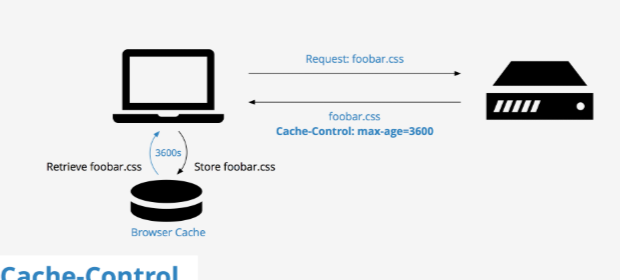
max-age sets a freshness lifetime for a response. no-cache does not mean “never store”; it means the response must be validated before reuse. no-store instructs caches not to store the response, which is appropriate for some sensitive material. private restricts storage to a private cache rather than shared caches, while public can make a response eligible for shared caching where the other conditions permit it.
These directives are not interchangeable. A page containing personalized account data may need a private policy or no storage, while a versioned public JavaScript file can often be cached for a long period. Applying no-store to every asset can increase traffic and slow visitors. Applying a public long-lived policy to personalized responses can expose information in a shared cache if the overall configuration is wrong.
Consider s-maxage when a shared cache needs a freshness lifetime that differs from a browser's. Other directives such as must-revalidate affect behavior after a response becomes stale. The right policy depends on the application and the intermediaries involved; do not copy an example without determining who is allowed to cache the response and for how long.
Learn how Vary affects cache keys
Some responses change according to request headers. A server may return different content based on accepted content encoding or language. Vary tells caches which request fields must be considered when selecting a stored representation. Without the appropriate variation, a cache could reuse a response generated for a different request context.
For example, if a server varies a response by Accept-Language, the cache needs to distinguish the relevant language requests. If compression changes the representation, the delivery stack must handle cache keys and validators consistently. Incorrect variation can cause surprising behavior that appears random because the wrong response is served only for certain combinations of headers.
Do not add every request header to Vary as a precaution. That can fragment the cache into many variants and reduce the reuse rate. Identify the headers that actually affect the representation and verify how the CDN or reverse proxy handles them. Test representative requests with different values, not only the default browser request.
Avoid stale-content surprises when files change
A long cache lifetime is safest when the URL changes when the content changes. A common asset pipeline includes a fingerprint or content hash in the filename, allowing a new version to be fetched under a new URL while old versions can remain cached until they are no longer referenced. This makes freshness policy more predictable than reusing the same URL for different bytes.
HTML often has different caching needs from the assets it references. The HTML document may be refreshed frequently while versioned images, scripts, and stylesheets can remain cached longer. If the document continues to point to old asset paths, the browser will keep using them even if newer files exist elsewhere. A deployment therefore needs to update the references and retain old assets long enough to avoid breaking pages already open or cached.
For APIs, be careful with mutable data and user-specific results. A response that was correct a minute ago may be wrong for an account balance or access control decision. Some endpoints are better served by short freshness lifetimes or revalidation. Others can be cached aggressively if the content is public and versioned. A clear deployment guide should state which resources are safe to cache and which must be refreshed more carefully.
Example: a browser appears to ignore the header
Suppose a developer sets Cache-Control: max-age=300 but sees a network request on every reload. First, confirm that the new header is actually present on the response rather than only in a configuration file that has not reached the running server. Next, check whether the request is a normal reload, a hard reload, or one made while the developer tools disable cache. Then inspect whether a service worker or proxy participates in the request.
If the response is personalized or has a no-store directive added by a framework, the cache may be acting correctly. If the file is served under a changing query string or URL, each address may represent a separate cache entry. If the cache is shared, a request may reach the CDN while not reaching the origin, so the network panel alone may not tell the whole story.
The lesson is to trace the request through the layers that actually exist. Confirm the response, compare it with the configured policy, reproduce with a consistent test, and then change one factor. Guessing at the header before observing the path often creates a second configuration problem instead of solving the first.
A practical cache-debugging checklist
- Inspect the real response: Confirm the headers delivered to the client, not just the application's source configuration.
- Identify the cache layer: Distinguish browser cache, service worker, reverse proxy, CDN, and origin behavior where possible.
- Check freshness and validation separately: A stored response may be stale and still be reusable after a conditional request.
- Test changed content: Update the resource and verify how the validator, URL, and cache lifetime interact.
- Review privacy boundaries: Ensure shared caches cannot reuse personalized content for unrelated users.
- Repeat under normal conditions: Disable any developer-tool overrides and use a consistent request method before drawing conclusions.
Questions for review
Does no-cache mean a response is never stored? No. It generally requires validation before reuse. no-store is the directive intended to prevent storage by caches.
Why might a response return 304? The client or cache has a stored representation and sends a conditional request. The server confirms that the selected representation has not changed according to the validator.
Should all static assets have the same lifetime? Not necessarily. Versioned assets, frequently changing files, and resources with privacy implications have different needs. Align cache lifetime with how changes are published and how the response is used.
Conclusion
HTTP caching becomes understandable when freshness, storage, and validation are treated as different concepts. Observe real headers, test with a controlled local resource, and compare ordinary requests with conditional ones. Use ETag or Last-Modified validators where appropriate, set cache directives according to privacy and change frequency, and account for request variation. A small experiment is more reliable than copying a header from an unrelated site. Record what you observed and turn the result into a reusable technical reference for future debugging.
Comments
Join the discussionNo comments yet. Be the first to comment.