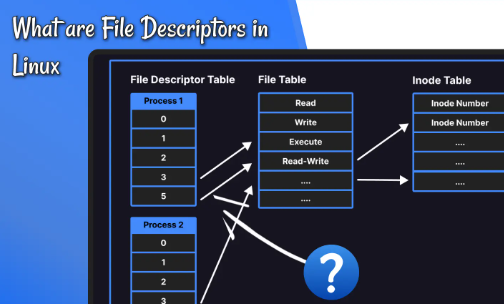
Linux applications use file descriptors to work with files, sockets, pipes, devices, and other resources exposed through file-like interfaces. When a process or system reaches a file descriptor limit, operations that normally work can begin failing. A web service may be unable to accept new connections, a worker may fail to open a log file, or a database client may report errors that appear unrelated to the descriptor table.
The familiar message Too many open files is a useful clue, but it does not identify the underlying cause by itself. The problem may be a process that opens resources and never closes them, a legitimate increase in concurrent connections, a low per-process limit, or a system-wide resource constraint. Effective troubleshooting starts by finding which limit has been reached and which resource is consuming descriptors.

Understand the descriptor model
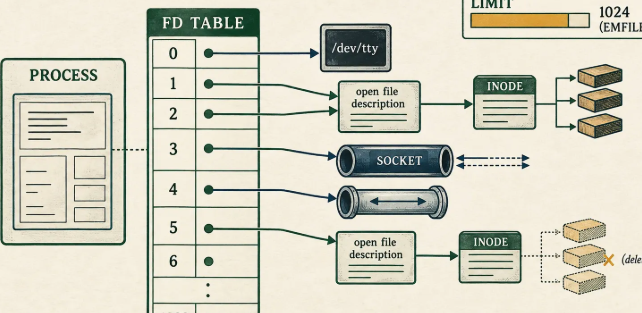
A file descriptor is a small integer used by a process to refer to an open resource. Standard input, standard output, and standard error normally occupy descriptors 0, 1, and 2. Additional descriptors are allocated as a process opens files, sockets, pipes, and other resources.
A descriptor number is not the file itself. It is a reference maintained for the process. Multiple descriptors can refer to the same underlying open file description, and descriptors can be inherited across process creation depending on how the program is written. This is why the count of open descriptors is a resource measurement rather than a direct count of unique disk files.
Sockets are especially important for servers. Each active network connection commonly consumes a descriptor, while additional descriptors may be used for logs, pipes, configuration files, and inter-process communication. A high-traffic process can legitimately need many descriptors, but an unexpected upward trend may indicate a leak or a workload change.
Identify the process that is affected
Start with the exact application error and the time it occurred. If the error comes from a systemd service, inspect its recent logs:
journalctl -u example.service --since "30 minutes ago"
Replace the unit name with the actual service. Search for errors such as EMFILE or Too many open files, and correlate them with connection volume, deployment events, or other failures.
Identify the main process with:
systemctl show example.service -p MainPID
Then inspect its current descriptor usage. If lsof is installed, this command can be useful:
sudo lsof -p 1234
Replace 1234 with the actual PID. The output can be large, so focus on the resource types and repeated patterns that matter to the incident. Do not assume every descriptor points to a disk file; sockets, pipes, and other resources also appear.
Count open descriptors for a process
A quick count can be obtained from the process's descriptor directory:
ls -1 /proc/1234/fd | wc -l
Use the correct PID and remember that the count is a snapshot. A busy process may open and close descriptors while the command runs. Repeat the measurement at intervals to see whether the count remains stable, fluctuates with traffic, or increases continuously.
For a closer look, inspect the symbolic links:
ls -l /proc/1234/fd
These entries may reveal repeated sockets, deleted log files, pipes, or files from an unexpected directory. Access may require appropriate permissions, and process termination can make the inspection disappear before you finish. Record enough evidence before restarting the service when operational conditions allow.
For foundational Linux diagnostics, it is useful to understand the difference between a current count, a configured limit, and a longer-term growth trend. They answer different questions and should not be treated as interchangeable.
Check per-process limits
Linux resource limits can constrain the number of file descriptors available to a process. Inspect the current shell's limits with:
ulimit -n
This command reports the soft limit for the current shell and processes it launches, subject to how the environment is configured. It does not necessarily show the limit of an already running service.
For systemd services, inspect relevant unit properties and the process limits. The LimitNOFILE setting can affect the number of open files available to the service, depending on the unit configuration and systemd defaults. You can review the unit with:
systemctl cat example.service
For a running process, the kernel exposes resource limits in:
cat /proc/1234/limits
Check the Max open files line. Compare the soft and hard limits with observed usage and the application's concurrency requirements. Raising a limit may be correct for a service designed to handle more simultaneous connections, but it should not be the first action when an unexplained leak is still active.
Separate process limits from system-wide limits
A process can reach its own limit even when the whole machine has available resources. Conversely, the host can encounter a broader resource constraint even if one process is below its individual threshold.
Inspect system-wide file handle statistics with:
cat /proc/sys/fs/file-nr
The values describe allocated file handles and the system's configured maximum in a kernel-dependent format. Consult the relevant kernel documentation for interpretation on the version you are using. Also review the available configuration value:
cat /proc/sys/fs/file-max
Do not change system-wide values simply because a service logged a descriptor error. First establish whether the process limit or broader kernel resource is the actual constraint. A large system-wide limit will not fix an application that retains every client socket forever.
Look for the resource pattern
When descriptors are exhausted, the next useful question is what kind of resources accumulate. A process with thousands of sockets may be experiencing a connection-management issue. A process with many entries pointing to deleted log files may be affected by log rotation. A growing number of pipes may indicate worker lifecycle problems or child processes that are not being reaped or closed correctly.
Use lsof output and /proc/PID/fd to inspect examples. Group by resource type and destination where useful. Avoid publishing sensitive paths, usernames, hostnames, or socket details in a public incident report.
If the descriptor count increases with every request and never returns to a baseline, reproduce the workload in a test environment if possible. Compare the count before, during, and after the activity. The difference between a stable high count and a continuously increasing count helps narrow the cause.
Understand sockets and connection behavior
For network services, descriptors may be consumed by established connections, listening sockets, upstream connections, or temporary sockets. Inspect network state with:
The limit change should be supported by an estimate of normal usage and realistic peak demand. Measure resource use under a representative workload before increasing a descriptor limit simply to remove an error temporarily.
ss -tanp
This shows TCP sockets; permissions and kernel configuration influence the process details visible. Look for a pattern that matches the application. A large number of established connections may be normal for a busy service, while repeated connections stuck in unusual states may warrant investigation of timeouts, upstream behavior, or client retries.
Connection limits and file descriptor limits are related but not identical. A service can be constrained by application worker capacity, ephemeral ports, memory, or a separate connection pool even when descriptor capacity remains. Use several measurements to avoid treating one metric as the whole explanation.
Review file and socket cleanup in the application
Common causes include opening a file without closing it on an error path, leaving a response body unread, failing to close a network connection, or creating worker processes that retain inherited descriptors. These issues are often best fixed in the application rather than by changing OS settings.
Inspect code paths that return early, raise exceptions, or retry after a failure. Resource cleanup should be handled reliably, using constructs appropriate to the language. In Python, for example, context managers can close files and response resources even when an exception occurs. Other languages have equivalent patterns such as defer, finally, or RAII.
A focused reproduction can help. Run a small number of repeated operations and monitor descriptor count. If each operation adds descriptors without releasing them, capture the pattern and investigate the allocation path. Memory profilers and runtime diagnostics may help when the language offers them, but first isolate the behavior in a controlled environment.
Change limits only after identifying capacity needs
If the application is behaving correctly and its documented concurrency model requires more descriptors, a limit increase may be reasonable. Estimate demand using expected concurrent connections, open files, logs, pipes, and headroom for spikes. Confirm the applicable per-process or system-wide setting and document the rationale.
Apply changes using the appropriate configuration mechanism rather than editing generated runtime state without a plan. If a systemd unit is changed, reload the unit definitions and restart the service only when the change requires it and the operational impact is understood. Verify the effective limit after the service starts.
Monitor the result under a representative workload. A higher limit should reduce the specific constraint without masking an ever-growing descriptor count. If usage rises toward the new ceiling, investigate the pattern rather than repeatedly increasing the limit.
After the fix, repeat the same workload and confirm that the count returns to an expected range. This verification is an important part of Linux practice because it distinguishes a real correction from a temporary recovery.
Document the incident and add monitoring
A useful runbook records the service, PID, error message, timestamp, descriptor count, relevant limits, resource pattern, changes made, and result of the retest. Avoid recording secret data or internal details that do not belong in the incident record.
Monitoring should track both absolute usage and change over time. An alert at a fixed percentage can provide warning, but the threshold should match the service's normal behavior and rate of growth. A service that grows rapidly may need an earlier warning than one with predictable daily cycles.
Add a regression test where feasible. For example, a test can repeat a file or connection operation and verify that resource use returns to an expected range. Not every leak can be captured in a simple test, but even a focused check can prevent an old problem from returning unnoticed.
Conclusion
File descriptor exhaustion is a symptom, not a root cause. Identify the affected process, measure its descriptor count, inspect /proc, lsof, service logs, and resource limits, then look for the pattern in files, sockets, pipes, or inherited resources. Separate per-process limits from system-wide constraints before making configuration changes.
Raise limits only when the workload and application design justify it. If descriptors grow without returning to a baseline, investigate resource cleanup in the application. The best fix is the one that addresses the cause and is verified under a realistic test, not simply the one that allows the process to run a little longer.
Comments
Join the discussionThe file-nr part is the one I would spell out in a runbook. On 2.6 and later, /proc/sys/fs/file-nr is three columns: allocated handles, a free-handles field that is hardwired to 0 (allocated already equals in use, so the middle number is not spare capacity), and the max. Reading column 2 as free is how people either bump file-max for nothing or miss a process that is only hitting its own RLIMIT_NOFILE.
Also, lsof -p PID and ls /proc/PID/fd | wc -l will not match even when nothing is leaking. lsof includes cwd, root, and mapped files that are not fds. If the count is climbing, group the symlinks under /proc/PID/fd first (socket vs pipe vs a path ending in (deleted)) before touching LimitNOFILE. A log the process still holds after rotation is a different fix from a socket that never closes.