Linux File Permissions Explained — The Complete Practical Guide
File permissions are one of those Linux concepts that most beginners learn at a surface level early in their studies and then discover, usually through a real problem, that the surface level understanding was insufficient for the situation they're now in. The three-tier model of owner, group, and others is straightforward enough when explained, but the practical application of it in multi-user environments, web server contexts, and scripting scenarios is genuinely more complex than the introductory explanation implies, and the gap between conceptual understanding and practical fluency is where most permission-related issues live.
Understanding permissions properly starts with understanding what they're protecting and why. Linux's permission model exists to enforce the principle of least privilege — the idea that processes and users should have access to exactly the resources they need for their legitimate purposes and no more. This isn't academic security philosophy; it's the practical architecture that prevents a single compromised user account from affecting other users' data, stops a malfunctioning process from overwriting system files, and ensures that web server processes can read website files without being able to modify them or read sensitive system files they have no business accessing.
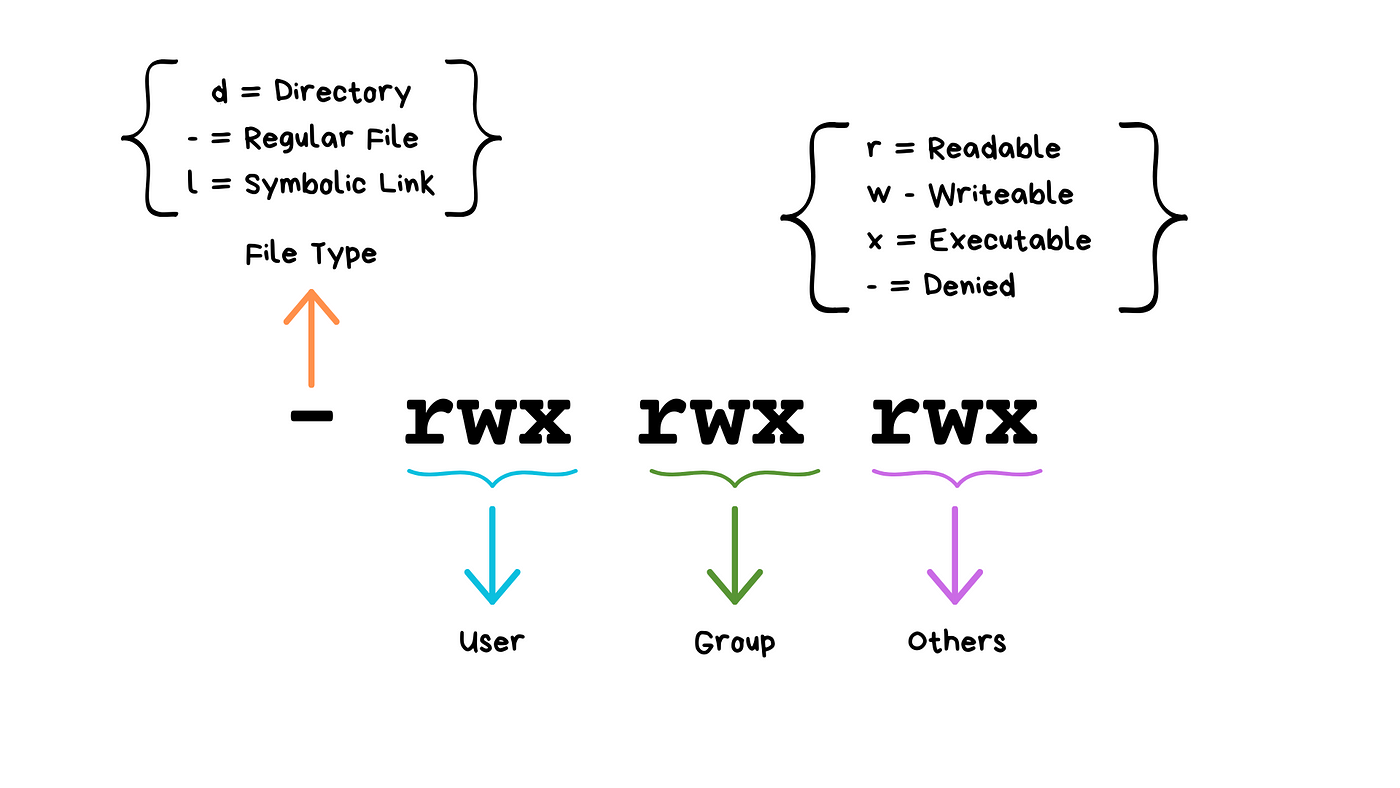
The basic permission model assigns three permission types — read, write, and execute — to three categories of accessor — the file's owner, the file's group, and everyone else. Each of these nine combinations can be set independently, which is expressed both as a symbolic notation using letters and as an octal numeric notation that allows the entire permission set to be expressed as a three-digit number. Both representations appear in real system administration work, and recognising and working with both is worth developing deliberately rather than learning one and treating the other as an advanced topic.
Where permissions get practically complex is in directory permissions specifically, which behave differently from file permissions in ways that frequently surprise people applying file permission logic to directories. The execute permission on a directory means the ability to enter it and access its contents — not to run it as a program. The implications of this for web server configurations, shared directories, and script deployment contexts are significant and worth understanding specifically through practical Linux learning rather than inferring from the file permission model alone.
Special permission bits add further complexity. The setuid and setgid bits change the effective user or group under which an executable runs, with significant security implications that make them worth understanding even if you're not deliberately using them — because recognising them in a real system tells you something important about how that system is configured. The sticky bit on directories, commonly used on shared temp directories, prevents users from deleting files they don't own even when they have write permission on the directory — a nuance that matters in multi-user environments and produces confusing behaviour if you don't know to look for it.
Access Control Lists extend the basic permission model for situations where the three-category model is insufficient — when you need to give a specific user access to a file without making them the owner or adding them to the file's group, or when you need more granular access control than three categories allow. These are a more advanced topic but one worth knowing exists before you encounter a situation where the basic model genuinely can't do what you need.
The most reliable way to develop genuine fluency with file permissions is through practice in a safe environment where you can experiment with different configurations and observe the results. A VMware virtual machine set up specifically for this purpose — where you can create test users, set up shared directories with different permission configurations, and verify the results by attempting operations as different users — teaches through direct experience in a way that reading about permissions alone doesn't achieve.
The practical payoff of genuine permission fluency shows up constantly in real Linux work: setting up web server document roots correctly, configuring SSH key permissions that the client will actually accept, troubleshooting script execution failures, managing shared development environments. Each of these situations requires understanding permissions well enough to diagnose what's wrong and know exactly what change will fix it — which requires going beyond the introductory explanation into the practical depth that structured Linux resources covering real-world scenarios build most effectively.